
Autofill any form with one click. Even the ones regular autofill ignores.
Tired of copying and pasting your links, cover notes, and details across job applications and repetitive portals? Form Secretary remembers your info and fills forms with a single click.
How Form Secretary works in 3 easy steps.
No complicated setup. Save your information once and let the extension do the typing.
Save your details
Add your links, emails, bios, work history, or test data into your personal library.
See the smart button
When you click on any input field on a web page, a neat little icon appears right beside it.
Click and fill
Click the icon to fill that field instantly, or click Autofill All in the popup to fill the whole page.
Why you will love Form Secretary.
Built to save you time on every single form you fill online.
Saves hours on job applications
Fill application forms on Workday, Greenhouse, Lever, Ashby, and company career sites without retyping your answers every time.
100% private to you
Your saved entries stay entirely inside your browser. No accounts, no cloud sync, and no third-party tracking.
Smart field recognition
It recognizes what the form is asking for by looking at labels, hints, and placeholders, even if the website uses unusual code.
Works where other tools fail
Modern forms sometimes reject normal copy-paste or standard autofill. Form Secretary ensures the page accepts your text smoothly.
Quick choice dropdown
If you have multiple emails, phone numbers, or addresses, a neat menu lets you pick the right one in an instant.
Easy backup & restore
Switching laptops or browsers? Export your saved fields with one click and import them back anytime.
Simple interface, out of your way.
Form Secretary stays quiet until you need it.
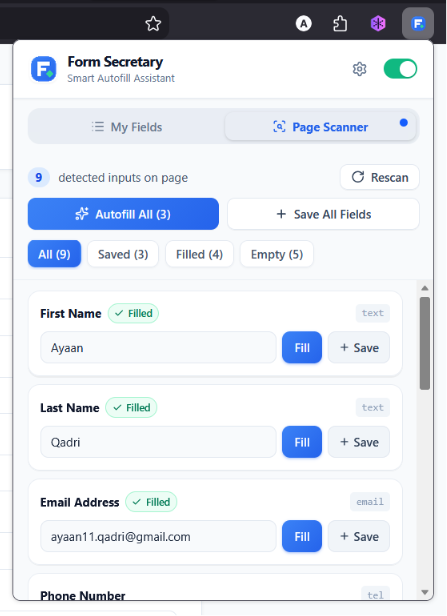
Page Scanner & Shortcuts
Quickly scan the current page and manage your saved information in one clean window.
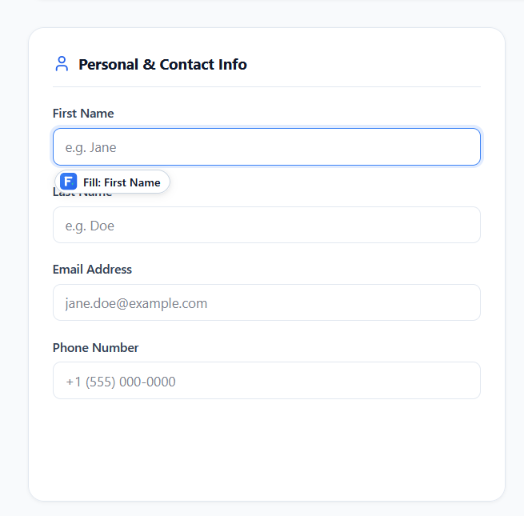
1-Click Trigger Button
Appears right beside the box you are typing into so you can fill it without opening any menus.
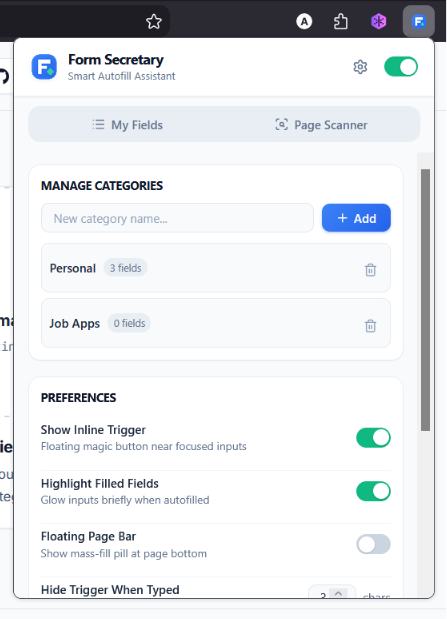
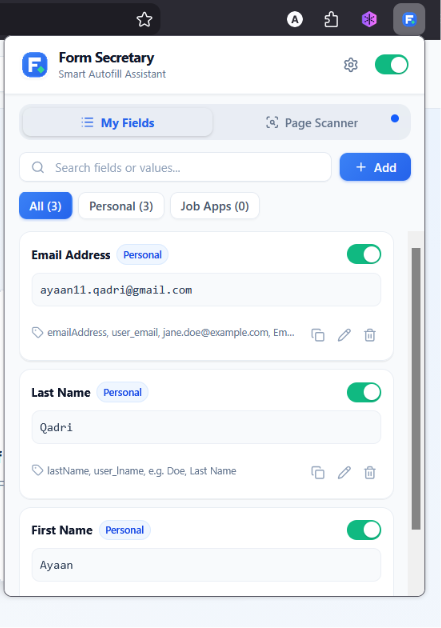
Custom Fields & Categories
Organize your details into Job Search, Personal, or Work categories with custom names.
Get started in under 30 seconds.
Form Secretary is officially live on browser stores. Choose your browser to install with 1 click.

Google Chrome
Chrome Web StoreOfficial release for all Chromium browsers. Seamless 1-click install and automatic silent updates via Chrome Web Store.
Add to Chrome (Free)

Mozilla Firefox
Firefox Add-onsOfficial signed add-on from Mozilla Add-ons (AMO). Fully reviewed, client-side only, and 100% private.
Add to Firefox (Free)
Build & Run from Source
Looking to contribute, test local branches, or inspect the source code?
-
1
Download or clone the repository:
git clone https://github.com/ayaan-qadri/form-secretary.gitCopy -
2
Install dependencies:
pnpm installCopy -
3
Build the extension:
pnpm buildCopy -
4
Load into your browser:
Go to
chrome://extensions, turn on Developer mode in the top right corner, click Load unpacked, and select the.output/chrome-mv3folder.
-
1
Install dependencies:
pnpm installCopy -
2
Build the Firefox bundle:
pnpm build:firefoxCopy -
3
Open Firefox Debugging:
Go to
about:debugging#/runtime/this-firefoxin your address bar. -
4
Load Add-on:
Click Load Temporary Add-on... and select
.output/firefox-mv2/manifest.json.
-
1
Install dependencies:
pnpm installCopy -
2
Run live development mode:
pnpm devCopy -
3
Run tests:
pnpm testCopy
Stop retyping the same form data.
Get Form Secretary today. Fast, reliable, and 100% private in your browser.